library(urbioconnect)
library(terra)
#> terra 1.9.50
library(sf)
#> Linking to GEOS 3.12.1, GDAL 3.8.4, PROJ 9.4.0; sf_use_s2() is TRUE
urbioconnect can perform habitat connectivity analysis
on either rasters from terra, and a
vectors built on sf. Both implement the
same underlying method from Kirk et al. (2023) and produce compatible
outputs. The choice between them depends on your input data format and
the scale of your analysis.
This vignette demonstrates the raster and vector methods on the same example data, compares their outputs, then offers practical guidance on which to choose.
Rasters and vectors
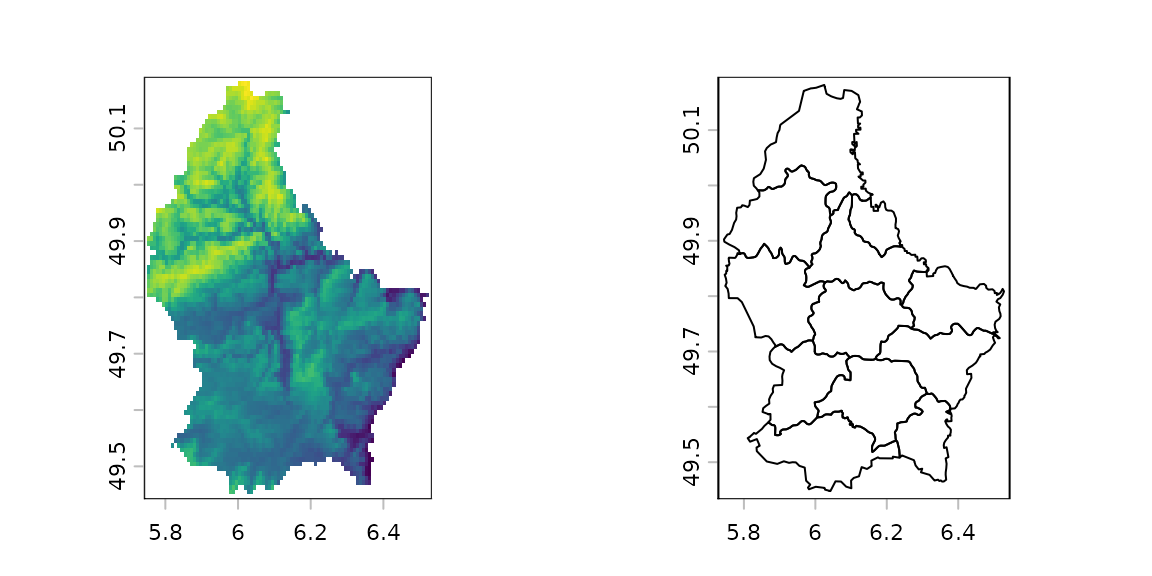
Rasters are essentially matrices - grids of cells at a fixed resolution. Vectors are essentially polygons - shapes drawn by a line. See below an example of Luxembourg as a raster on the left, where the colour values correspond to elevation. On the right is a vector, showing the 12 different cantons.
urbioconnect uses rasters that work on
SpatRaster (Spatial Raster) objects. Buffering is performed
using a focal window (terra::focal()), and connected
patches are identified using terra::patches().
The vector approach works on sf objects. Habitat and
barriers are represented as polygons. Buffering uses
sf::st_buffer(), and connectivity is determined by spatial
intersection (sf::st_intersects()).
Both approaches expose convenience functions:
habitat_connectivity() for rasters, and
sf_habitat_connectivity() for vector. These run the full
workflow in a single call.
Running raster and vector models on the same data
Prepare the example data
The package ships with lizard habitat and barrier data from Darebin Creek in Melbourne. The habitat is available as a raster, and the barrier as both a raster and a shapefile.
# Raster inputs
habitat_rast <- example_habitat()
barrier_rast <- example_barrier()

# Vector inputs
# Convert the habitat raster to polygons for the vector approach
habitat_sf <- terra::as.polygons(example_habitat(), dissolve = TRUE) |>
  sf::st_as_sf()

barrier_sf <- example_barrier_shp()
#> Reading layer `lizard_barrier' from data source
#>   `/home/runner/work/_temp/Library/urbioconnect/ex/lizard_barrier.shp'
#>   using driver `ESRI Shapefile'
#> Simple feature collection with 1 feature and 1 field
#> Geometry type: MULTIPOLYGON
#> Dimension:     XY
#> Bounding box:  xmin: 326089.6 ymin: 5820342 xmax: 327662.5 ymax: 5821909
#> Projected CRS: GDA94 / MGA zone 55
It is good practice to clean vector data before analysis, especially
when working with real-world shapefiles that may contain topology errors
or overlapping polygons. We have a clean() function in
urbioconnect which runs sf::st_make_valid(),
then unions the polygons, then simplifies with
st_simplify().
Raster approach
We will compare the raster and vector data timings, as well, using
the tictoc package
library(tictoc)
#>
#> Attaching package: 'tictoc'
#> The following objects are masked from 'package:terra':
#>
#>     shift, size
tic()
raster_result <- habitat_connectivity(
  habitat = habitat_rast,
  barrier = barrier_rast,
  species = "Blue-tongued Lizard",
  interpatch_distance = interpatch_dist,
  verbose = FALSE
)
rast_time <- toc()
#> 1.875 sec elapsed

raster_result
#> # A tibble: 1 × 9
#>   species     interpatch_distance n_patches effective_mesh_ha prob_connectedness
#>   <chr>                     <dbl>     <int>             <dbl>              <dbl>
#> 1 Blue-tongu…                  10       703              3.92          0.0000149
#> # ℹ 4 more variables: patch_area_mean <dbl>, patch_area_total_ha <dbl>,
#> #   data_resolution <chr>, patch_size <list>
habitat_connectivity() returns a
connectivity object: a one-row landscape summary
(n_patches, effective_mesh_ha,
prob_connectedness, and so on). The per-patch areas that
summary is built from travel with it in a list-column, and can be pulled
out with patch_sizes():
raster_patches <- patch_sizes(raster_result)[[1]]
raster_patches
#> # patch_size_tbl:      data.frame
#> # Species:             Blue-tongued Lizard
#> # Patches:             703
#> # Resolution:          2x2
#> # Interpatch Distance: 10 m
#>   patch_id    area
#>      <dbl>   <dbl>
#> 1        1    60.0
#> 2        2  1648.
#> 3        7    12.0
#> 4        8  1200.
#> 5       10 92034.
#> # ℹ 698 more rows
raster_patches has columns patch_id and
area (square metres).
Vector approach
tic()
vector_result <- sf_habitat_connectivity(
  habitat = habitat_sf_clean,
  barrier = barrier_sf_clean,
  species = "lizard",
  interpatch_distance = interpatch_dist
)
vect_time <- toc()
#> 8.603 sec elapsed

vector_result
#> # patch_size_tbl:      data.frame
#> # Species:             lizard
#> # Patches:             483
#> # Resolution:          NA
#> # Interpatch Distance: 10 m
#>   patch_id  area
#>      <dbl> <dbl>
#> 1        1 1536.
#> 2        2  287.
#> 3        3  292.
#> 4        4  850.
#> 5        5    8
#> # ℹ 478 more rows
Unlike habitat_connectivity(),
sf_habitat_connectivity() returns the per-patch table
directly – a patch_size_tbl with one row per connected
patch and columns patch_id and area, rather
than a summarised connectivity object. This asymmetry
between the raster and vector entry points is a known follow-up, noted
again below.
Comparing raster vs vector
Both approaches identify one connected patch per row of their respective per-patch tables, with patch area and squared area.
Small differences in patch counts and areas are expected. The raster approach discretises space into cells, so patch boundaries are approximated at the chosen resolution. The vector approach preserves exact polygon geometry, so it typically produces slightly different (and arguably more precise) patch boundaries, particularly along curved or irregular barrier edges.
#> [1] 1.875Timings for the methods are also important to consider. The raster approach took 1.875 seconds, and the vector approach took 8.603 seconds.
Summarising connectivity metrics
habitat_connectivity() already returns the landscape
summary directly (raster_result, above). For the vector
approach, sf_habitat_connectivity() returns the per-patch
table, so it needs an explicit summarise_connectivity()
call to produce the equivalent summary. Pass the
patch_size_tbl straight through –
summarise_connectivity() reads the species, interpatch
distance, and resolution from the object itself, so there is no need to
supply them again:
summarise_connectivity(connectivity = vector_result)
#> # A tibble: 1 × 9
#>   species interpatch_distance n_patches effective_mesh_ha prob_connectedness
#>   <chr>                 <dbl>     <int>             <dbl>              <dbl>
#> 1 lizard                   10       483              4.18          0.0000160
#> # ℹ 4 more variables: patch_area_mean <dbl>, patch_area_total_ha <dbl>,
#> #   data_resolution <chr>, patch_size <list>
Compare that against the raster summary computed earlier:
raster_result
#> # A tibble: 1 × 9
#>   species     interpatch_distance n_patches effective_mesh_ha prob_connectedness
#>   <chr>                     <dbl>     <int>             <dbl>              <dbl>
#> 1 Blue-tongu…                  10       703              3.92          0.0000149
#> # ℹ 4 more variables: patch_area_mean <dbl>, patch_area_total_ha <dbl>,
#> #   data_resolution <chr>, patch_size <list>
The metrics - effective mesh size, probability of connectedness, mean patch area - will be close but not identical between the two approaches, reflecting the geometric differences described above.
Which approach should you use?
One factor to consider is what format your input data is already in. The other factor to consider is whether the data is large and computational time is important. For many situations, the raster based approaches will be much faster.
| Situation | Recommended approach |
|---|---|
| Habitat data is a GeoTIFF or other raster | Raster (habitat_connectivity()) |
| Habitat data is a shapefile or GeoPackage | Vector (sf_habitat_connectivity()) |
| Very large study area (regional scale) | Raster (faster for large grids) |
| Small, precise study area | Vector (no resolution loss) |
| Need output maps or GeoTIFFs | Raster (native map output) |
| Exact polygon boundaries matter | Vector (no rasterisation artefacts) |
Raster approach trade-offs
- Faster for large study areas because operations run on regular grids
- Straightforward to visualise as maps and export as GeoTIFFs for use in GIS software
- Resolution must be chosen upfront: coarser resolution speeds up computation but loses fine-scale habitat detail
- A slight loss of geometric precision is introduced when rasterising polygon inputs
Vector approach trade-offs
- Preserves exact polygon geometry with no resolution-related approximation
- Better suited to small, precisely delineated study areas
- No need to choose a resolution
- Can become slow for complex geometries with many vertices; running
clean()beforehand helps
Converting between raster and vector
If your habitat is in raster format but you want to use the vector approach (or vice versa), conversion is straightforward.
# Raster to vector
habitat_sf <- terra::as.polygons(example_habitat(), dissolve = TRUE) |>
  sf::st_as_sf()

# Vector to raster (requires a template grid)
rasters <- prepare_rasters(
  habitat = habitat_sf,
  barrier = barrier_sf,
  data_resolution = 10,
  target_resolution = 500
)
habitat_rast <- rasters$habitat_raster
barrier_rast <- rasters$barrier_raster
prepare_rasters() handles the conversion from
sf to SpatRaster at the resolutions you
specify, aligning the habitat and barrier grids so they are ready for
the raster approach.
Analysis step-by-step
Both approaches expose individual functions if you need finer control - for example, to inspect intermediate outputs or to substitute a custom step.
# Raster step-by-step
barrier_mask <- create_barrier_mask(barrier_rast)
remaining <- drop_habitat_under_barrier(habitat_rast, barrier_mask)
buffered <- habitat_buffer(remaining, interpatch_distance = 10)
fragmented <- fragment_habitat(buffered, barrier_mask)
patches <- assign_patches_to_fragments(remaining, fragmented) |>
  add_patch_area()
areas <- aggregate_connected_patches(patches)
# Vector step-by-step
buffered_sf <- sf_habitat_buffer(habitat_sf_clean, interpatch_distance = 10)
fragments_sf <- sf_fragment_habitat(buffered_sf, barrier_sf_clean)
remaining_sf <- sf_drop_habitat_under_barrier(habitat_sf_clean, barrier_sf_clean)
patches_sf <- sf_assign_patches_to_fragments(remaining_sf, fragments_sf) |>
  sf_add_patch_area()
areas_sf <- sf_aggregate_connected_patches(patches_sf)
References
Kirk, H., Soanes, K., Amati, M., Bekessy, S., Harrison, L., Parris, K., Ramalho, C., van de Ree, R., & Threlfall, C. (2023). Ecological connectivity as a planning tool for the conservation of wildlife in cities. MethodsX, 10, 101989. https://doi.org/10.1016/j.mex.2022.101989